
In the first blog post, we focused on the motivation and organization of enterprise architecture management (EAM). In this post, we will take a closer look at communication; specifically, the documentation of the enterprise architecture. Documentation itself is a form of communication between the author and the reader. Let’s begin by examining the content and structure of documentation. We’ll then take a look at the tools available for EAM documentation and what you should consider when selecting them.
Why Do You Need Documentation of Your Enterprise Architecture?
The primary goal of documentation is to share important information about the enterprise architecture (EA) across the organization. This ensures that knowledge about the enterprise architecture and its further development is distributed and shared within the company. A shared understanding enables different actors to collaborate and work toward common goals. One key advantage of documentation is its ability to reach readers who join the organization later or who were not included in the initial communication. As a result, documentation provides a communication channel that is consistent, repeatable and time-independent.
Which Components Should Your Documentation Include?
Every organization has an architecture made up of various components. These components represent simplified models of individual aspects of the company. Each component can include detailed information relevant for enterprise architecture management, e.g. endpoints and specifications for services. EAM focuses on the targeted implementation of these components within the organization. Let’s have a look at a few possible components:
| Component Type |
Description |
Examples |
| Capabilities | Capabilities which the organization has or would like. | Recruiting Customer Support |
| Data | Data and the information contained within it is an important resource for the organization. Data management is a driver for an enterprise architecture. | Employee Information Product Data |
| Organizational Units | Organizational units are often where expertise and capabilities are bundled together. They are normally the main users of certain specialized applications and data. | Personnel Department Accounting |
| Processes | Processes are operational workflows which combine technical tasks and functions to add value to a company. | Employ New Personnel |
| Application Systems | Application systems are used for supporting organizational units in their administrative tasks and processes. They are normally used for recording and using data within the processes. | HR System CRM System |
| Software System | Software systems are software which is installed and used for operating application systems. An application system can comprise various software systems which work together and build on each other. | Java Runtime Alpine Linux |
| Hardware | Hardware portrays the physical components of the IT landscape. These are essential for operating the systems running on it. Hardware can be hosted on-premise or externally or fully abstracted through the cloud. | Server Router Firewall |
Overview of Central Component Types of an Enterprise Architecture with Description and Examples
It quickly becomes apparent that the level of abstraction and the aspects of the components vary significantly. While a server can be identified quite precisely, capabilities are far more difficult to distinguish. The target groups within the company dealing with each type of component also differ greatly. For this reason, these components are grouped (into sub-architectures) with similar audiences and comparable levels of abstraction. This makes them easier for the various stakeholders to understand. Typical sub-architectures include:
- Business architecture: focusing on the organizations and business processes that prepare products and services.
- Application architecture: focusing on bundling supporting functions into applications and their interfaces.
- Technical architecture: focusing on operational aspects such as servers, networks and software installations.
- Data architecture: focusing on the organization’s information needs and their representation in data.
Depending on the focus and objectives of enterprise architecture management, additional sub-architectures can be defined, from strategic planning and planning of supply chains, right the way through to production processes.
Components and Their Relationships
When looking at the individual components, one question quickly arises: Isn’t it all connected? And that is exactly the point. The components and sub-architectures are interconnected; only when these relationships are linked with each other in a way which makes sense do they form an architecture. These connections or relationships typically have different contextual meanings (semantics). For a server, for example, it is relevant which software is running and which application that software enables. For applications, it is important to know which departments use them.
Example: An HR manager uses the HR software implemented by the software “Rainbow HR”. This software is an international product, so English terminology is used for its data objects. These relationships can be evaluated as a graph. You can then use this graph to identify all dependencies, regardless of whether they are direct or indirect (i.e. transitive dependencies).
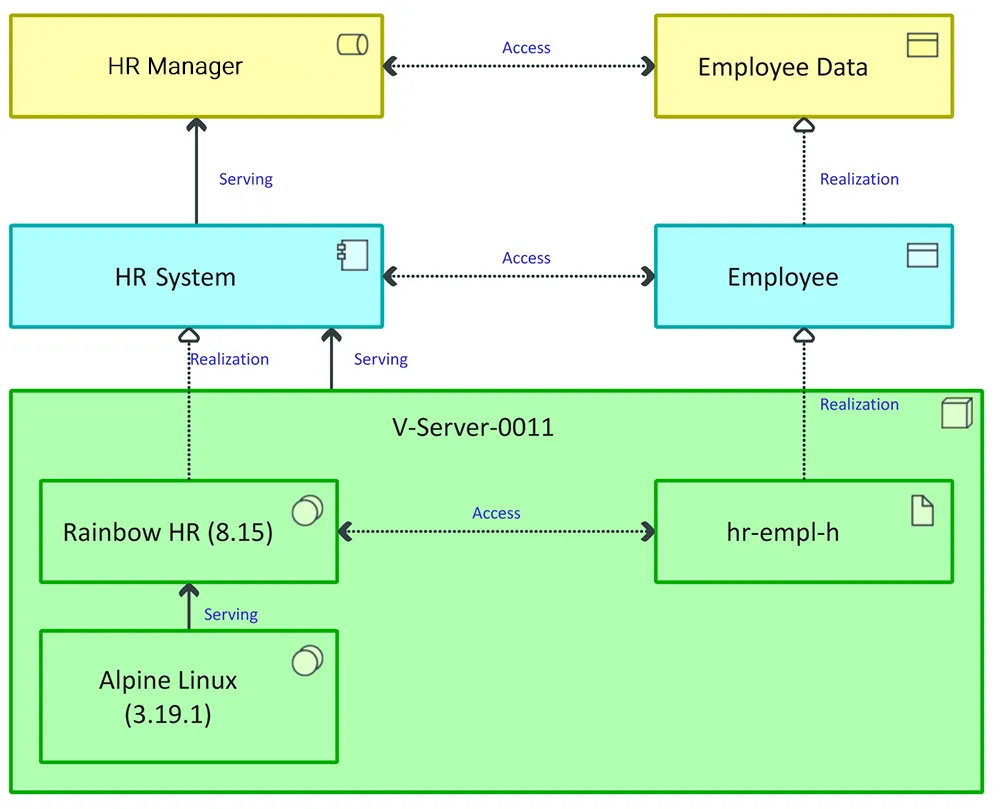
Example: If the hiring process is assigned to the HR manager and the software supports this process, then it also supports the HR manager. This is important for analyses, e.g. to determine which organizational units are affected when architectural changes are made or when a failure occurs.
Forms of Documentation
In addition to the content of your documentation, which depends heavily on the information you want to communicate, the next question is where and how these details are created and shared. In general, there are two types of documentation: tabular documentation and model-based documentation.
Tabular Documentation
Tabular depiction is a simple and intuitive way to get started quickly with documentation. It usually doesn’t require specialized software and is often created using lists or tables. These tables contain the information you want to communicate for each type of component. This type of documentation can be carried out quickly as it focuses on maintaining individual types of components, such as server lists. However, it has its limitations when it comes to deriving insights or assessing consequences. Typical questions such as “What impact does a change to the HR system have on my organization?” are often difficult to portray and analyze and focus on. Common tools for tabular documentation include Excel, Confluence or configuration management databases (CMDBs).
|
Advantages |
Disadvantages |
|
|
Pros and Cons of Tabular Documentation
Model-Based Documentation
Model-based documentation is another option as well as tabular documentation. In its simplest form, it resembles sketching. Modeling tools provide reusable elements and support standardized graphical notations. Common notations include ArchiMate®, the somewhat older ARIS method and the more technical UML. Today, ArchiMate® is used as the EAM standard. ArchiMate® defines model elements (nodes) and the relationships (edges) between them. This creates a visual language that enables architecture documentation to be consistent and easily understood by all.
This approach focuses less on the component type and more on the relationships and links between multiple components. While it’s harder to verify, for example, whether a server list is fully maintained, it is possible to precisely depict individual components with universal dependencies. Dependency analyses can be carried out more easily with this type of documentation. Tools such as Innovator are well suited for model-based enterprise architecture documentation.
|
Advantages |
Disadvantages |
|
|
Pros and Cons of Model-Based Documentation
Combining Tabular and Model-Based Documentation
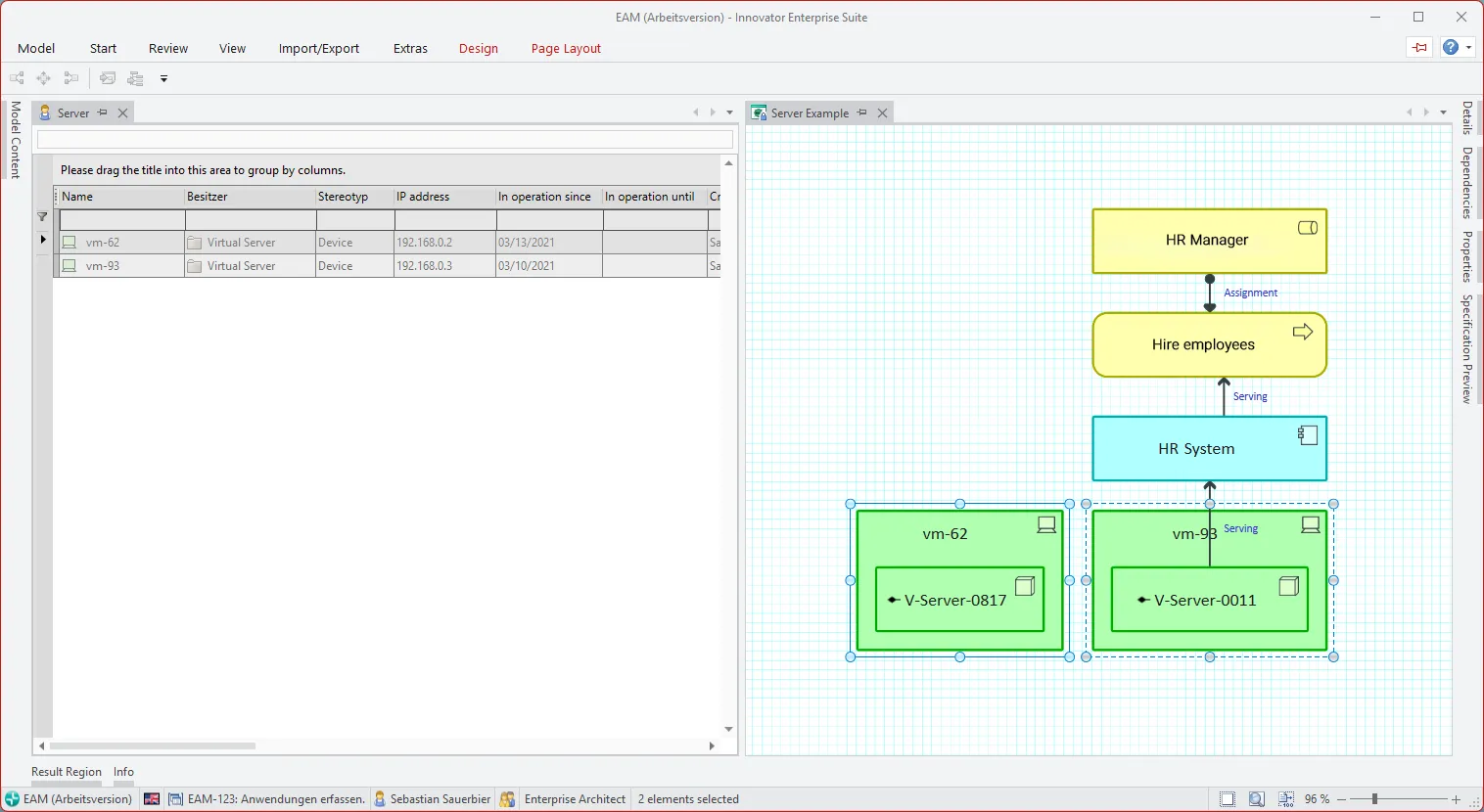
Because each documentation method has its strengths and weaknesses, modern tools often incorporate aspects of both. Table-oriented tools generate interactive graphs that focus on one component and allow you to expand dependencies step-by-step. Model-based tools, on the other hand, often include table views for tasks such as import/export to allow a simple maintenance option for object types.
Choosing the Right Tool
You can certainly start documenting or visualizing your enterprise architecture using common tabular or sketching tools. However, these solutions quickly reach their limits when it comes to clarity and time-consuming maintenance. To document your architecture efficiently and sustainably, you should use a professional EAM tool such as Innovator. When selecting the right tool, make sure it offers the following key features:
- Component repository to store information about the components.
- Import options and adapters to import existing information from other sources within the company and keep documentation up-to-date.
- Reports to monitor documentation quality and answer recurring questions.
- Dependency analyses to evaluate and plan for changes.
- The option to provide tailored perspectives for different stakeholders.
Depending on your focus and level of experience, both tabular and model-based tools can be valuable. Good tools combine the strengths of both approaches.
Summary
We’ve seen that documenting an enterprise architecture means capturing the components of your organization and their relationships to document enterprise architecture and its various aspects. Various sub-architectures linked with each other are used. Which enterprise architecture components and relationships you choose to focus on depends on your planned changes and the information you need.
In general, there are two main types of documentation tool: Model-based and tabular. Each approach has its advantages and disadvantages but both can complement each other. The ArchiMate® standard is widely supported across nearly all tools for model-based documentation of enterprise architecture. In the third and final part of our EAM blog series, we’ll show you how to put your enterprise model into practice – stay tuned!
Have you already recognized the benefits of EAM but lack the resources to roll it out in your organization?
Then our EAMplicity offer is just what you are looking for! EAMplicity allows you to benefit from EAM quickly. Our experts set up your enterprise model, so you don’t need to invest time in training someone to do it. Now is the time to take advantage of the many benefits of EAM.
Our Tip
Tool: We recommend the powerful tool, Innovator, when it comes to documenting Enterprise Architecture; use it to map your entire architecture in accordance with the ArchiMate® EAM standard. Check it out yourself and test Innovator and all its features 60 days for free.
Notation: Download our free notation poster to help you quickly get to grips with the ArchiMate® standard. It explains the various elements, relationships and layers defined in ArchiMate®. Request your free printed poster or compact PDF version and start documenting your model right away. In the third and final part of our EAM blog series, we’ll show you how to put your enterprise model into practice.
Do you want to get started straight away? Then get in touch with our EAM specialists and find out how to successfully implement EAM within your company. Book a no-obligation consultation and chat to our EAM specialists.